

Install Plex Media Server on Ubuntu 24.04, 22.04 or 20.04
Install Plex Media Server through its current official APT repository and check that the service starts.


Plex Media Server organizes videos, music and photos for playback on different devices. It can transcode compatible media when a client needs another format. Features include:
- A central library for videos, music and photos.
- Transcoding for compatible devices and formats.
- Remote access when configured and permitted.
- A visual interface for browsing the library.
- Custom libraries and playlists.
- Apps for many devices, including phones and smart TVs.
- Selected content sharing with other users.
- Updates distributed by Plex.
Prepare Ubuntu
Update package information and install the tools needed to add a signed repository.
sudo apt updatesudo apt install -y curl gnupg2Add the current Plex APT repository
Create the APT keyring directory, then import Plex’s current signing key.
sudo mkdir -p /etc/apt/keyringscurl -L https://downloads.plex.tv/plex-keys/PlexSign.v2.key | sudo gpg --yes --dearmor -o /etc/apt/keyrings/plexmediaserver.v2.gpgAdd the official Plex repository. Plex changed repository and signing key starting with its 1.43.0 release; replace any old Plex APT entry before using this one.
echo "deb [signed-by=/etc/apt/keyrings/plexmediaserver.v2.gpg] https://repo.plex.tv/deb/ public main" | sudo tee /etc/apt/sources.list.d/plex.listInstall Plex Media Server
Refresh package information and install the server.
sudo apt updatesudo apt install -y plexmediaserverCheck the service
Check whether the Plex Media Server service is running.
systemctl status plexmediaserver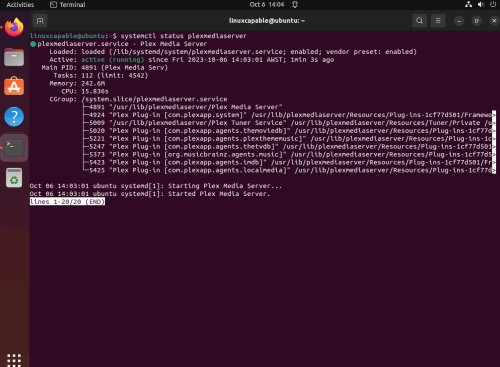
Repository instructions: official Plex support.
Share
What's Your Reaction?
 Like
0
 Dislike
0
 Love
0
 Funny
0
 Angry
0
 Sad
0
 Wow
0


